For business inquiries : (+971) 561803315
For special requests : (+971) 561803315
For business inquiries : (+971) 561803315
For special requests : (+971) 561803315

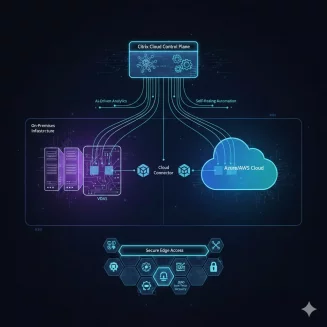
In this training course, you will learn how to implement Citrix Desktop as a Service (DaaS) on Microsoft Azure. Through hands-on exercises and practical guidance, you will gain the skills necessary to deploy and manage your Citrix DaaS deployment in the Microsoft Azure cloud environment. This course will cover essential topics such as planning machine catalogs, designing virtual machines, deploying Virtual Delivery Agent machines using Machine Creation Services, and integrating Citrix Cloud and Citrix DaaS with Microsoft Azure Active Directory.













Module 1: Introduction to Citrix Desktop as a Service (DaaS) Implementation on Microsoft Azure
Understanding the Collaboration between Citrix and Microsoft Azure
Exploring the Fundamentals of Citrix DaaS Components
Overview of the Citrix DaaS Deployment Process
Module 2: Planning - Citrix DaaS Resource Allocation on Microsoft Azure
Understanding the Structure of Citrix DaaS Resources in Azure
Creating an Effective Plan for Citrix DaaS Deployment
Overview of Resource Allocation Strategies for Citrix DaaS in Azure
Module 3: Planning – Microsoft Azure Infrastructure Overview
Exploring the Azure Virtual Network Architecture
Understanding Connectivity Options within Azure Virtual Network
Overview of Key Azure Virtual Resources
Managing Identity and Access with Azure Active Directory
Evaluating Azure Active Directory Options for Citrix DaaS Deployment
Module 4: Deployment Planning – Implementing Citrix DaaS on Microsoft Azure
Strategizing Citrix DaaS Resource Placement within Azure Environment
Configuring Citrix DaaS Components within Azure Infrastructure
Creating and Administering Workloads in Azure Resource Locations
Module 5: Access Provisioning – Enabling End User Access
Providing Access to Citrix DaaS Resources through Citrix Cloud
Deploying Citrix Gateway or ADC in Microsoft Azure
Configuring GSLB and StoreFront Optimal Gateway in Hybrid Scenarios
Module 6: Rollout - Deploying Citrix DaaS on Microsoft Azure
Managing Citrix Workspace App Deployment
Preparing for the Migration of End Users to the Workspace Platform
Module 7: Management - Administering Citrix DaaS Workloads on Microsoft Azure
Ensuring the Continuity of Citrix Gateway Operations
Implementing Backup and Monitoring Solutions in Azure Environment
Managing Master Images for Citrix DaaS Workloads
Monitoring Virtual Desktop Agents (VDAs) in Management Console and Azure
Module 8: Optimization - Enhancing Citrix DaaS Performance on Microsoft Azure
Cost Management Strategies for Azure Resources
Utilizing Azure Pricing Calculator for Cost Estimation - Instructor Demonstration
Student Exercise – Cost Calculation Scenario Analysis